

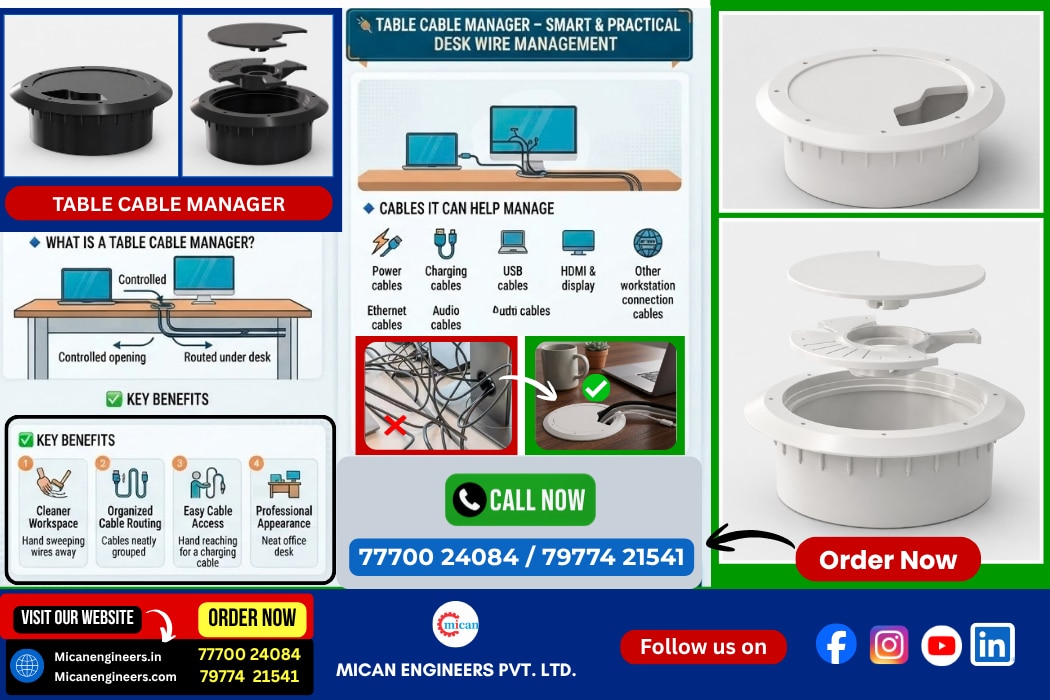
Table Cable Manager for Desk Wire Management : A Complete Guide
A modern workstation often requires multiple electronic devices such as computers, monitors, keyboards, mobile chargers, power adapters, speakers, networking equipment, and other peripherals. While these devices improve productivity, they can also create a common problem—cable clutter.
Loose wires running across a desk can make a workspace look untidy, become difficult to organize, and interfere with everyday work. A Table Cable Manager for Desk Wire Management provides a simple and practical way to route, organize, and manage these cables while keeping them accessible.
Whether used in a corporate office, home office, conference room, workstation, reception area, or educational environment, a table cable manager helps create a cleaner and more organized workspace.
What Is a Table Cable Manager ?
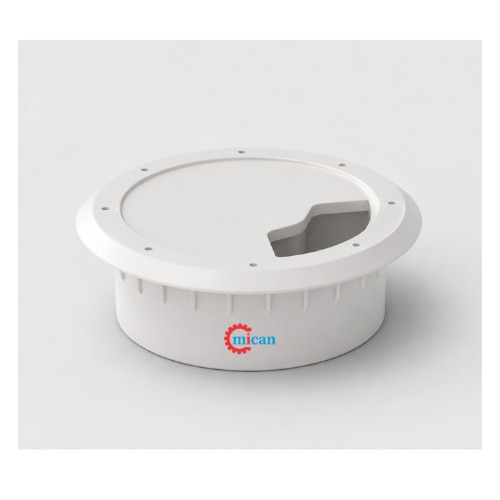
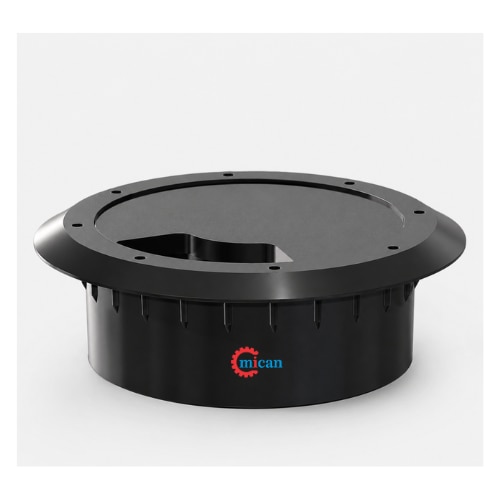
A Table Cable Manager is a desk-mounted cable management accessory designed to provide an organized path for electrical, charging, USB, data, and other cables.
It is generally installed on or through a desk or tabletop, allowing cables to pass through a controlled opening rather than hanging loosely from the edge of the table.
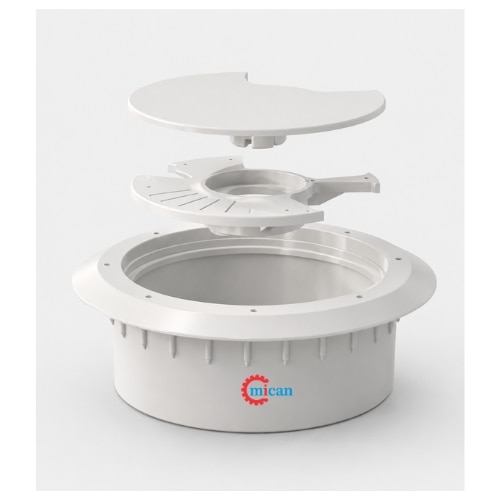
Depending on the design, a cable manager may include a cable-routing opening, brush or flexible inserts, a cover, mounting components, or other features that help hold and guide cables.
The basic purpose is simple:
Bring cables to the required location while keeping the desk surface neat and organized.
Why Is Desk Wire Management Important ?
As the number of electronic devices used at a workstation increases, cable management becomes increasingly important.
A poorly organized desk can have :
Power cables crossing the workspace
USB cables lying randomly on the desk
Monitor cables hanging from the tabletop
Phone charging cables getting misplaced
Adapter wires becoming tangled
Cables falling behind the desk
Difficult access when a device needs to be disconnected
A table cable manager helps provide a dedicated route for these cables.
1. Reduces Cable Clutter
One of the primary purposes of a desk cable manager is to reduce visible cable clutter.
Instead of allowing several cables to spread across the tabletop, cables can be routed through a designated management point.
This creates a cleaner and more organized appearance.
2. Keeps Cables Accessible
Cable management should not mean hiding cables so effectively that they become difficult to use.
A properly designed table cable manager keeps cables routed neatly while allowing users to access them when required.
This is particularly useful for frequently used charging and USB cables.
3. Creates a Professional Workspace
In offices and commercial environments, workstation appearance contributes to the overall presentation of the workplace.
A well-organized desk with properly routed cables looks cleaner and more professional than a workspace with loose wires running in different directions.
4. Helps Prevent Tangling
Multiple cables placed together can easily become tangled.
A cable manager provides a defined routing point that helps keep cables separated and organized.
5. Makes Cleaning Easier
Loose wires can make it difficult to clean a desk properly.
By routing cables through a dedicated cable management point, the tabletop becomes easier to wipe and maintain.
How Does a Table Cable Manager Work ?
The working principle of a table cable manager is straight forward.
A suitable opening or cable-routing point is provided in the desk or tabletop. The cable manager is then installed at this location.
Cables from devices such as :
Monitors
Computers
Chargers
Keyboards
Mice
Speakers
Printers
Networking devices
USB hubs
can be routed through the cable manager.
The cables can then continue below or behind the desk toward the power socket, computer, docking station, or other equipment.
Typical Cable Routing :
Device → Cable Manager → Under-Desk Cable Route → Power/Data Connection
This simple arrangement keeps the visible portion of the cable controlled and reduces unnecessary cable loops on the desk.
Types of Cables That Can Be Managed :
A table cable manager can be useful for many different types of workstation cables.
1. Power Cables
Desktop computers, monitors, adapters, and other equipment commonly require power cables. Cable management helps route these cables toward power outlets without leaving excess cable across the desk.
2. USB Cables
USB cables are frequently used for charging, data transfer, keyboards, mice, USB hubs, and other peripherals.
3. HDMI and Display Cables
Monitor and display connections often require relatively long cables. Routing them through a desk cable manager helps keep these cables organized.
4. Ethernet Cables
Network cables can also be routed through a suitable cable management opening to maintain a cleaner workstation.
5. Audio Cables
Speakers, headphones, microphones, and other audio devices can generate additional cable clutter.
6. Charging Cables
Smartphones, tablets, wireless accessories, and other portable devices often require charging cables at a workstation.
A cable manager provides a convenient route for these frequently used cables.
Common Applications of Table Cable Managers :
Table cable managers are suitable for a wide range of environments.
1. Corporate Offices
Modern office desks may include computers, monitors, docking stations, phones, chargers, and networking equipment.
A cable manager helps maintain an organized workstation.
2. Home Offices
With more people working remotely, home workstations often contain multiple electronic devices.
A table cable manager can help transform a cluttered home desk into a cleaner working environment.
3. Conference Rooms
Conference tables frequently require HDMI, USB, power, networking, and charging connections.
Cable management helps keep these connections organized and accessible to meeting participants.
4. Training Rooms
Training tables may be equipped with laptops, projectors, charging points, and other electronic equipment.
Cable routing helps prevent wires from spreading across the table.
5. Educational Institutions
Computer laboratories, classrooms, libraries, and study areas can benefit from organized cable routing.
6. Reception Areas
Reception desks commonly contain computers, telephones, chargers, printers, and other equipment. Cable management helps maintain a clean appearance in customer-facing areas.
7. IT Workstations
IT professionals often work with multiple computers, monitors, networking devices, and peripherals. Organized cable routing can make equipment connections easier to identify and maintain.
Benefits of Using a Table Cable Manager :
1. Cleaner Desk Appearance
The most visible benefit is a cleaner tabletop with fewer loose wires.
2. Better Organization
Cables can be routed through a defined location instead of being scattered around the workstation.
3. Improved Accessibility
Frequently used cables can remain accessible while still being organized.
4. Easier Maintenance
When cables follow an organized route, it becomes easier to identify and replace individual cables.
5. Better Workspace Management
Cable organization contributes to a more structured workstation and can help reduce unnecessary visual clutter.
6. Suitable for Different Work Environments
The same basic concept can be used in offices, meeting rooms, educational spaces, home workstations, and other environments.
Table Cable Manager vs. Loose Cable Arrangement
Feature | Table Cable Manager | Loose Cable Arrangement |
|---|---|---|
| Cable organization | Organized routing | Cables may spread randomly |
| Desk appearance | Clean and structured | Can appear cluttered |
| Cable accessibility | Controlled and accessible | Often difficult to manage |
| Cleaning | Easier around cable area | More difficult |
| Cable identification | Easier to trace | Can become confusing |
| Workspace appearance | Professional | May look untidy |
| Cable routing | Defined path | Uncontrolled path |
Where Should a Table Cable Manager Be Installed ?
The ideal position depends on the desk layout and the location of connected equipment.
A cable manager can typically be positioned where cables naturally need to pass from the tabletop toward the underside of the desk.
When selecting the installation location, consider :
Distance from the devices
Location of power sockets
Position of monitors and computers
Cable length
Desk structure
Frequency of cable access
Available space underneath the desk
For frequently connected devices, the cable manager should be positioned within convenient reach.
Factors to Consider When Selecting a Table Cable Manager :
Not every desk has the same requirements. Before selecting a cable management solution, consider the following factors.
1. Number of Cables
Determine how many cables need to pass through the cable manager.
A workstation with a monitor, computer, charger, USB hub, and networking equipment may require more cable capacity than a simple home desk.
2. Cable Diameter
Different cables have different diameters.
The cable manager should provide sufficient space for the required cables without excessive compression.
3. Desk Thickness
If the product requires drilling or mounting through the tabletop, check the compatible desk thickness before installation.
4. Installation Method
Consider whether the cable manager is :
Surface mounted
Insert mounted
Grommet style
Clamp mounted
Fixed through a tabletop opening
The installation method should match the desk construction.
5. Material
Depending on the application, cable managers may be manufactured using materials such as plastic, metal, rubber, or combinations of different materials.
Material selection should consider durability, appearance, operating environment, and expected usage.
6. Appearance
For corporate offices, reception areas, conference rooms, and premium workspaces, the appearance of the cable manager may be an important consideration.
A compact and well-finished design can integrate more naturally with the furniture.
7. Accessibility
If users frequently connect and disconnect devices, select a design that provides easy access to the cables.
Installation of a Table Cable Manager :
Installation depends on the specific design.
For a tabletop insert or grommet-style cable manager, the general installation process may involve :
Step 1: Select the Location
Identify a suitable location where cables need to pass through the desk.
Step 2: Check the Desk Structure
Ensure there are no structural components, electrical components, or other obstructions underneath the selected location.
Step 3: Prepare the Opening
If the design requires a tabletop opening, create an opening according to the manufacturer's recommended dimensions.
Step 4: Install the Cable Manager
Place the cable manager into the prepared opening or mount it according to its installation design.
Step 5: Route the Cables
Pass the required cables through the cable manager.
Step 6: Organize the Underside
Route the cables underneath the desk toward the appropriate power, network, or equipment connection.
Step 7: Check Accessibility
Make sure frequently used cables can be accessed without removing the cable manager.
Note* : Always follow the manufacturer's installation instructions and use appropriate tools and safety precautions when modifying a desk.
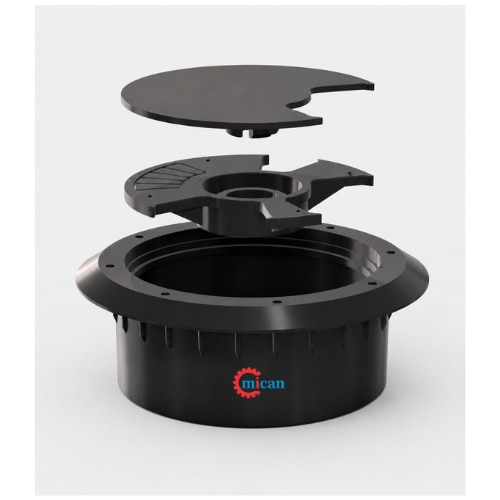
Table Cable Manager for Modern Workstations :
Modern workstations increasingly combine multiple technologies in a limited space.
A typical workstation may include :
Laptop + Monitor + Keyboard + Mouse + Mobile Charger + USB Hub + Speakers + Network Connection
Without cable management, these devices can quickly create a collection of wires.
A table cable manager provides a centralized cable-routing point that helps organize this setup.
It is therefore particularly useful for modern office furniture, modular workstations, collaborative desks, and technology-enabled meeting tables.
Table Cable Management for Conference Tables
Conference rooms often require temporary or permanent access to power and data connections.
A cable manager can provide a controlled path for :
Laptop charging cables
HDMI cables
USB connections
Network cables
Display connections
Audio cables
This can make meeting tables more practical while reducing visible cable clutter.
Table Cable Manager for Home Office Setup
A home office can also benefit significantly from organized cable routing.
A typical home-office desk may have a laptop, monitor, mobile charger, printer, speakers, and other accessories.
Instead of allowing charging and power cables to run across the desk, the cable manager can provide a centralized routing location.
This creates a more organized workspace without requiring a complicated cable management system.
Cable Management Is More Than Just Appearance
Although a cleaner appearance is one of the most obvious advantages, cable management also contributes to easier workstation maintenance.
When cables are routed systematically, users can more easily determine which cable belongs to which device.
For businesses with multiple workstations, consistent cable management can also make desk setup and maintenance more standardized.
Maintenance Tips :
To maintain an organized cable management system :
Avoid overloading the cable opening.
Do not sharply bend cables at the entry point.
Keep cables separated where practical.
Check cables periodically for visible damage.
Label important cables in complex installations.
Leave sufficient cable length for normal device movement.
Avoid pulling cables forcefully through the manager.
Keep power and data cables organized according to the requirements of the installation.
Q) Frequently Asked Questions :
1. What is a table cable manager?
A table cable manager is a desk accessory used to route and organize cables passing through or around a tabletop.
2. What cables can be used with a desk cable manager?
Depending on its size and design, it can accommodate power, USB, HDMI, Ethernet, charging, audio, and other workstation cables.
3. Can a table cable manager be used in an office?
Yes. It is commonly suitable for office workstations, conference tables, reception desks, training rooms, and other professional environments.
4. Can it be used for a home office?
Yes. A table cable manager can help organize cables for laptops, monitors, chargers, speakers, and other home-office equipment.
5. Does a cable manager hide all cables?
Not necessarily. Its primary purpose is to provide an organized routing path. The amount of cable that remains visible depends on the desk layout and installation.
6. How many cables can one table cable manager accommodate?
The capacity depends on the design, opening size, and cable diameters. The manager should be selected according to the number and size of cables that need to pass through it.
Conclusion :
A Table Cable Manager for Desk Wire Management is a simple but useful solution for organizing the growing number of cables found in modern workspaces.
By providing a dedicated route for power, charging, USB, display, networking, and other cables, it helps reduce desk clutter while keeping important connections accessible.
From corporate workstations and conference tables to home offices, training rooms, reception desks, and educational environments, effective cable management can contribute to a cleaner, more organized, and easier-to-maintain workspace.
When selecting a table cable manager, consider cable capacity, cable diameter, desk thickness, installation method, material, accessibility, and overall design to ensure it suits the intended application.
A well-planned cable management solution does not simply hide wires—it creates a more organized and functional workstation.
 Check our products : https://www.micanengineers.in/all-products/1
 Contact us to know more about our Table Cable Manager / Desk Wire Management Solutions.
 Official Company Address :
#TableCableManager #CableManagement #DeskCableManagement #WireManagement #CableOrganizer #OfficeAccessories #Workstation #OfficeFurniture #WorkspaceOrganization #SmartWorkspace #tablecablemanager #tablecablemanagement #deskcablemanager
@mumbai @chennai @ahmedabad @pune
